Text tool
Tiny Text Generator
Shrink words into superscript and small caps.
Your text
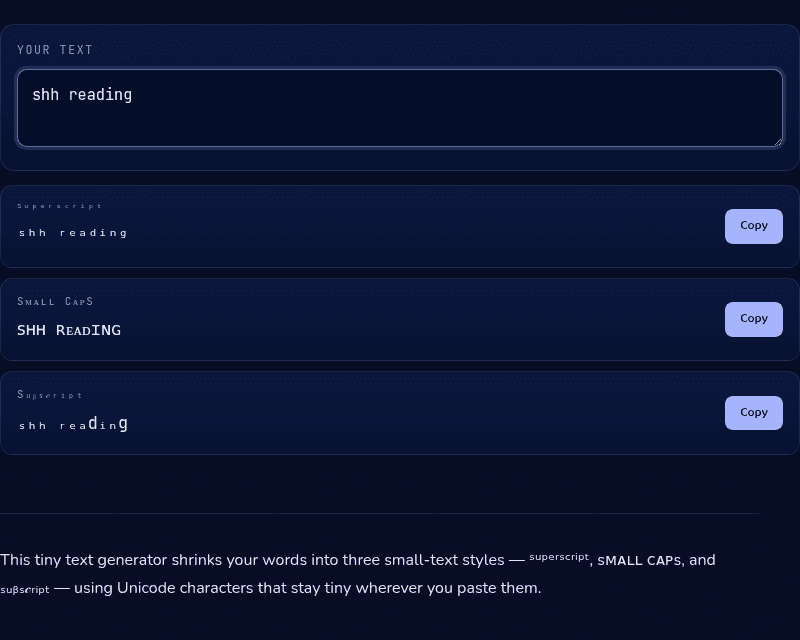
ᔆᵘᵖᵉʳˢᶜʳⁱᵖᵗ
ᵗⁱⁿʸ ᵗᵉˣᵗ
Sᴍᴀʟʟ Cᴀᴘs
ᴛɪɴʏ ᴛᴇxᴛ
Sᵤᵦₛ𝒸ᵣᵢₚₜ
ₜᵢₙy ₜₑₓₜ
How it works
This tiny text generator converts your words into three small-text styles built from real Unicode characters — superscript (from phonetic notation), small caps (from the phonetic alphabet), and subscript (from chemistry and math notation) — rather than a scaled-down font. Because these are genuine Unicode characters, the small size travels with the text through copy-paste into places that strip real formatting.
When you'd use this
- A quiet aside in a caption or bio: small caps or superscript text reads as a whispered footnote next to normal-sized text in an Instagram or Twitter bio.
- Subtle emphasis without shouting: superscript text adds a stylistic flourish to a short phrase without the visual weight of bold or all-caps.
- Stylized usernames and display names: small caps gives a Discord or gaming display name a sleek, formal look that stands apart from ordinary usernames.
Frequently asked questions
How do I make tiny text for my bio?
Type your text above, copy the superscript or small caps result, and paste it into your bio. The characters carry their size with them — no formatting needed.
Why are some letters normal-sized in the output?
Unicode's superscript and subscript sets are incomplete — a few letters (like q in superscript) simply don't exist in small form, so they pass through unchanged.
What's the difference between small caps and superscript?
Small caps are uppercase letterforms at lowercase height, sitting on the normal baseline — sᴍᴀʟʟ ᴄᴀᴘs. Superscript letters are smaller still and raised above the baseline — ˡⁱᵏᵉ ᵗʰⁱˢ.
Is tiny text readable by screen readers?
Poorly — many screen readers announce the phonetic character names instead of the words. Keep tiny text decorative and short.
From the blog
Related tools