How to Read Binary Code: From 01001000 to "H"
01001000 01101001 spells "Hi". Decoding that by hand takes two steps and about thirty seconds once you know the method — no computer science background required.
This guide covers base 2 arithmetic, the character table that turns numbers into letters, converting in both directions by hand, why machines settled on two symbols in the first place, and how to encode a message — "I love you," a name, a date — for a gift, tattoo, or piece of jewelry.
Base 2: counting with two symbols
Decimal uses ten symbols and place values that multiply by ten: 407 means four hundreds, zero tens, seven ones. Binary uses two symbols and place values that multiply by two. Reading an 8-digit byte from left to right, the places are 128, 64, 32, 16, 8, 4, 2, 1.
To read any byte, add the place values wherever there's a 1. Take 01001000: the ones sit in the 64 and 8 columns, so the value is 72. That's the entire conversion — no arithmetic beyond addition.
From number to letter
Computers store text as numbers, using a lookup table. In ASCII — and in UTF-8, which is identical for English characters — uppercase A is 65 through Z at 90, lowercase a is 97 through z at 122, and the digits 0–9 sit at 48–57. The space character is 32.
So 01001000 = 72 = H. Continue with 01101001: ones in the 64, 32, 8, and 1 columns gives 105, which is lowercase i. "Hi" decoded by hand.
Two shortcuts worth memorizing. Every lowercase letter is exactly 32 more than its uppercase version, which in binary means only the third bit differs — that's why case conversion is nearly free for a processor. And any byte starting with 010 is an uppercase letter, while 011 signals lowercase, letting you classify characters at a glance before doing any math.
Converting text to binary by hand
Going the other direction: look up the character's number, then break it into place values largest first. For lowercase c, the number is 99. Does 128 fit? No, write 0. Does 64 fit into 99? Yes — write 1, leaving 35. Does 32 fit into 35? Yes — write 1, leaving 3. 16, 8, 4 don't fit: three zeros. 2 fits into 3, leaving 1: write 1. Then 1 fits exactly: write 1. Result: 01100011.
Check your work instantly by pasting the result into our Binary Translator — it decodes in either direction and auto-detects which one you need.
Why 8 bits, and what happens beyond English
Eight bits became the standard byte because 256 possible values comfortably covered the English alphabet in both cases, digits, punctuation, and control codes, while being a convenient power of two for hardware. Early ASCII actually used only seven bits, leaving the eighth for error checking or extended characters.
The world's other writing systems don't fit in 256 slots, which is why Unicode exists and why UTF-8 uses variable length: English characters stay one byte, while accented Latin, Greek, Cyrillic, CJK characters, and emoji use two to four bytes each. A single emoji can occupy four bytes, and combined emoji like family groupings chain several sequences together — one visible symbol, dozens of binary digits underneath.
Why computers use binary at all
Because two states are physically reliable. A transistor is on or off, a voltage is high or low, a region of magnetic material is polarized one way or the other. Building a circuit that distinguishes ten distinct voltage levels is possible but fragile — noise, temperature drift, and component ageing blur the boundaries. Distinguishing "clearly on" from "clearly off" tolerates enormous imprecision.
That reliability compounds. Binary also lets logic operations map to simple physical gates, and lets errors be detected and corrected with straightforward math. Every abstraction above — text, images, video, this sentence — sits on that two-state foundation.
Reading longer binary quickly
Two habits make hand-decoding fast. First, chunk aggressively: split the stream into 8-digit groups before doing anything else, since a missing digit early corrupts everything after it. Second, learn the four-bit halves — 0100 is 4 and 1000 is 8, so 01001000 is "4 and 8" in the high and low nibbles, which is 72 without stepping through all eight place values.
That nibble habit is also why hexadecimal exists: each hex digit represents exactly four binary digits, so 01001000 becomes 0x48 — the same byte in two characters instead of eight. Programmers read hex rather than binary for exactly this reason, and it's the same base-16 notation used in the hex color codes on our Color Converter.
Encoding a message as a gift
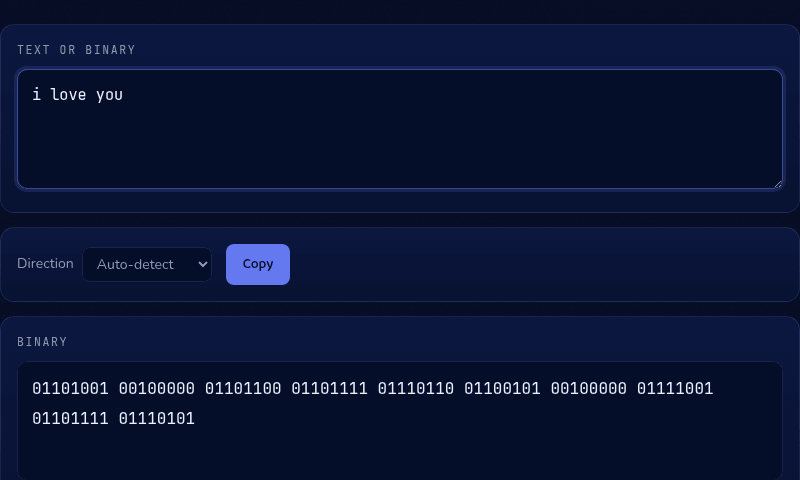
"I love you" in 8-bit binary is 01101001 00100000 01101100 01101111 01110110 01100101 00100000 01111001 01101111 01110101 — one byte per character, spaces included as their own byte (00100000). It's a popular choice for a tattoo, a piece of jewelry, or a note, precisely because it looks cryptic to anyone who can't read it and takes thirty seconds to decode for anyone who can.
The same method works for a name, a date written out as words, or a short phrase — encode it with the translator below, then double-check it decodes back to the exact message before it goes somewhere permanent.
Practice both directions
Decoding by hand is the fastest way to make base 2 stick, and having an instant answer key makes practice painless. Our Binary Translator converts text to binary and back with auto-detection, handling emoji and non-Latin characters with the wider encodings they need. When you're ready for the other classic two-symbol code, the Morse Code translator works the same way.