Making an Aesthetic Username with Vaporwave-Style Text
An aesthetic username generator usually means picking soft, dreamy words — moon, petal, mist — but the visual "aesthetic" look itself comes from styling, not word choice: wide-spaced fullwidth Unicode characters are what actually give a username that spaced-out, vaporwave-adjacent look. Once you've picked a word, running it through a fullwidth converter is what makes it look like the usernames in aesthetic Pinterest boards and Instagram bios.
Here's how that styling works, and how to apply it to a username you've already decided on rather than starting from a random word list.
The word matters less than the styling
Most "aesthetic username generator" tools are really word-suggestion tools — they pick from a curated list of soft, nature-adjacent, or nostalgic words and hand you a plain-text suggestion. The distinctive visual look people associate with aesthetic usernames — wide, evenly spaced, slightly retro-computing letterforms — comes from a completely separate step: converting the word to fullwidth Unicode characters.
That means you don't need a word-idea generator at all if you already know what you want your username to be. Take the word, run it through a fullwidth converter, and you get the visual effect without needing the tool to suggest the word for you.
Fullwidth, caps, and the bracketed variants
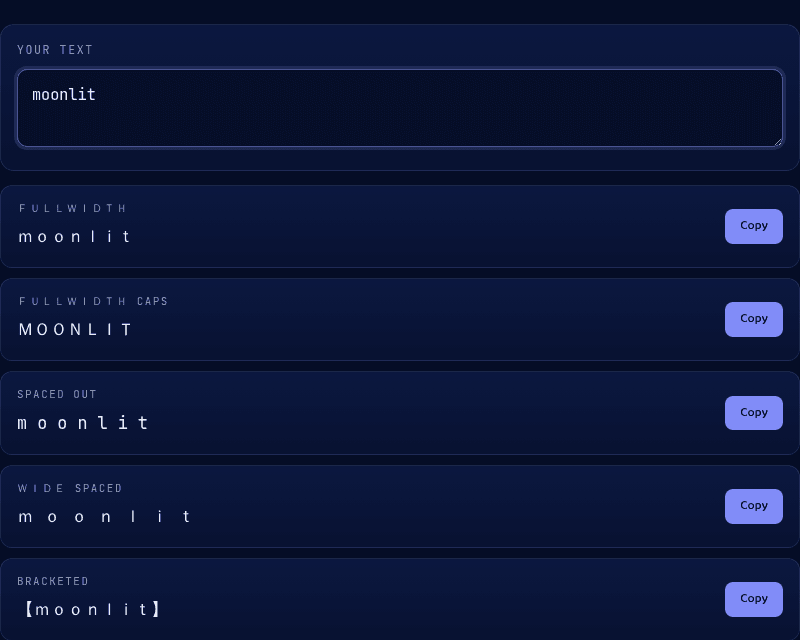
Plain fullwidth (moonlit) is the core effect and works for lowercase usernames. Fullwidth caps (MOONLIT) is the same effect in uppercase, which reads bolder and more retro-terminal. Bracketed 【moonlit】 adds a decorative frame that a lot of aesthetic profiles use to set the username apart from the rest of the bio text.
Because these are standard Unicode characters, not a font or formatting, they paste directly into Instagram, TikTok, and Discord usernames and bios wherever styled characters are accepted at all.
Style your username
Type the username you've already chosen into our Vaporwave Text tool and copy whichever fullwidth variant fits your profile. It runs entirely in your browser, and pairs well with the Fancy Text tool if you want a script or bold style instead of the wide aesthetic look.